Integrated engineering ecosystem

Guided demo available

Connect engineering information to asset life-cycle decisions

AssetStudio Workspace brings engineering information, reliability analysis, Reliability Digital Twin analysis, spare analysis and Life Cycle Cost into a shared environment for asset-intensive industries.

A working demonstration environment now shows how each specialised workspace can support a focused engineering task and preserve context from historical information through to system and investment decisions.

AssetStudio Workspace architecture

Five connected engineering workspaces

Engineering Information

Organise records, trends and technical context.

01

Reliability Data Analysis

Develop models from failure and maintenance data.

02

Reliability Digital Twin

Connect reliability, operations, resources and production.

03

Spare Analysis

Evaluate inventory populations and spare requirements.

04

Life Cycle Cost

Compare the long-term consequences of alternatives.

05

Working demonstration environment

See how engineering information moves through the Workspace

The current demonstration uses a consistent power-generation case to show how records, reliability models, system scenarios and economic results can remain connected. Demonstrations are guided by AssetStudio and adapted to the prospective client's engineering questions.

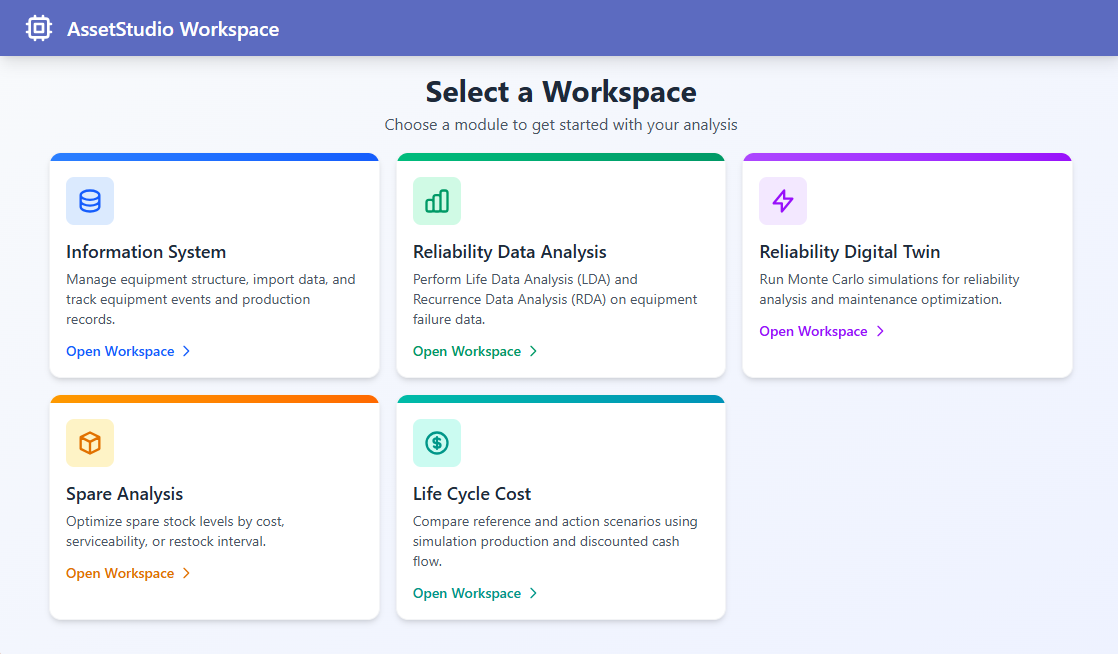
AssetStudio Workspace landing page showing five specialised engineering workspaces
One shared environment provides access to Engineering Information, Reliability Data Analysis, Reliability Digital Twin, Spare Analysis and Life Cycle Cost. Access to the demonstration is arranged directly with AssetStudio.

01 · Engineering Information

Organise the asset hierarchy and retain operating context

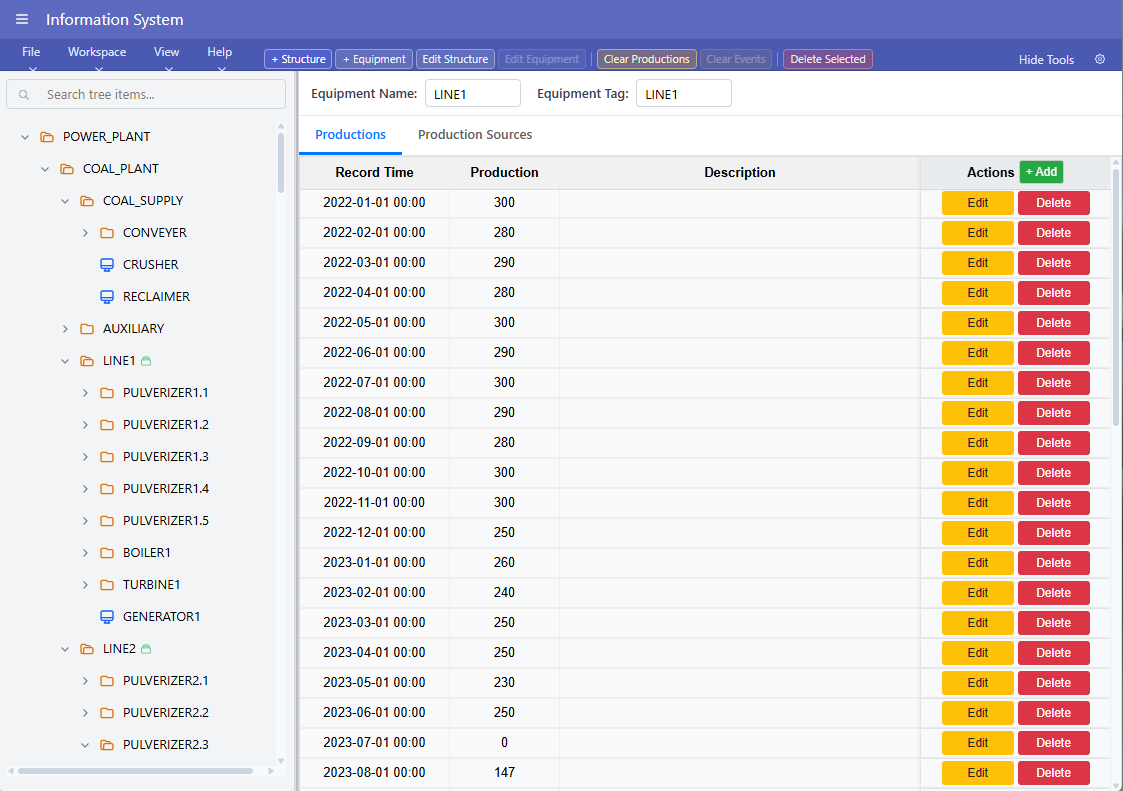
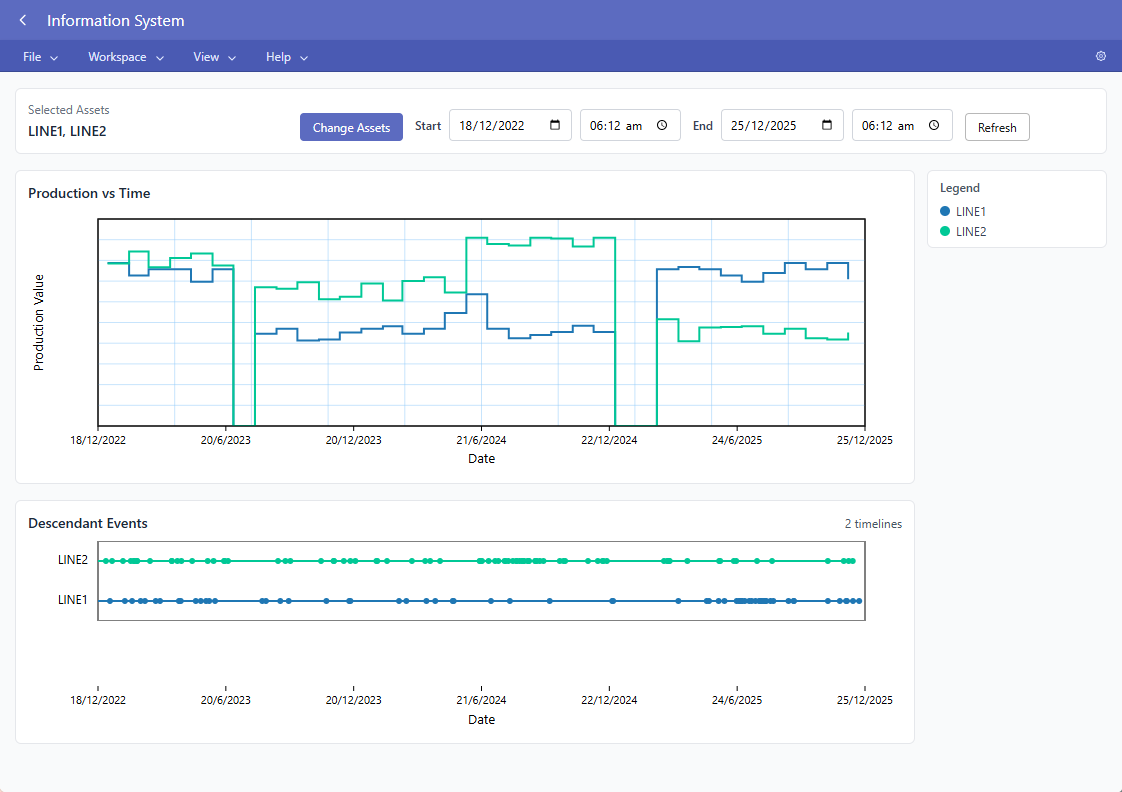
Equipment structures, production records, event timelines and trends are kept together so engineers can identify relevant events and carry their context into later analyses.

Asset hierarchy and production records in the Engineering Information workspace
Asset hierarchy with equipment-level production records and event data.
Production profiles and equipment event timelines in the Engineering Information workspace
Production profiles and event timelines preserve operating context across selected assets.

02 · Reliability Data Analysis

Develop reliability models from selected historical events

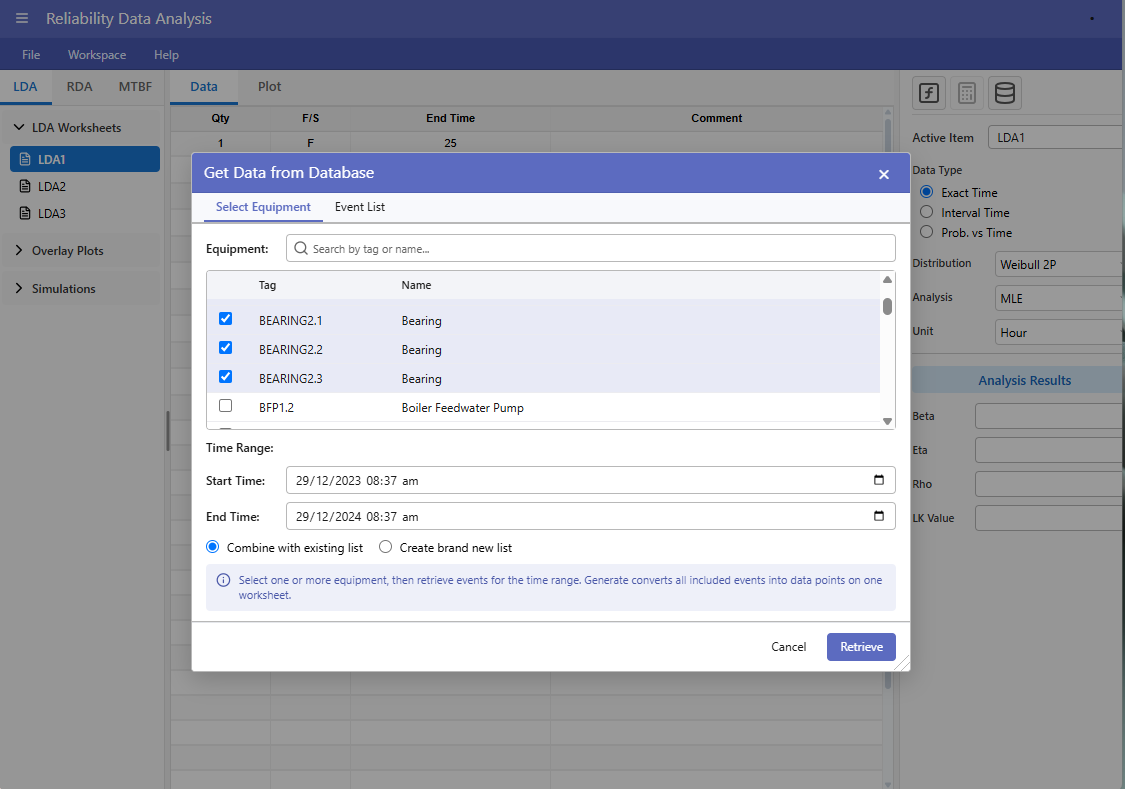
Engineers can retrieve downtime events for selected equipment and time periods, then use Life Data Analysis or Recurring Data Analysis to develop models without rebuilding the data context manually.

Retrieving equipment downtime events for Reliability Data Analysis
Selected downtime events are retrieved from the shared engineering information for analysis.

03 · Reliability Digital Twin

Test improvement scenarios at system level

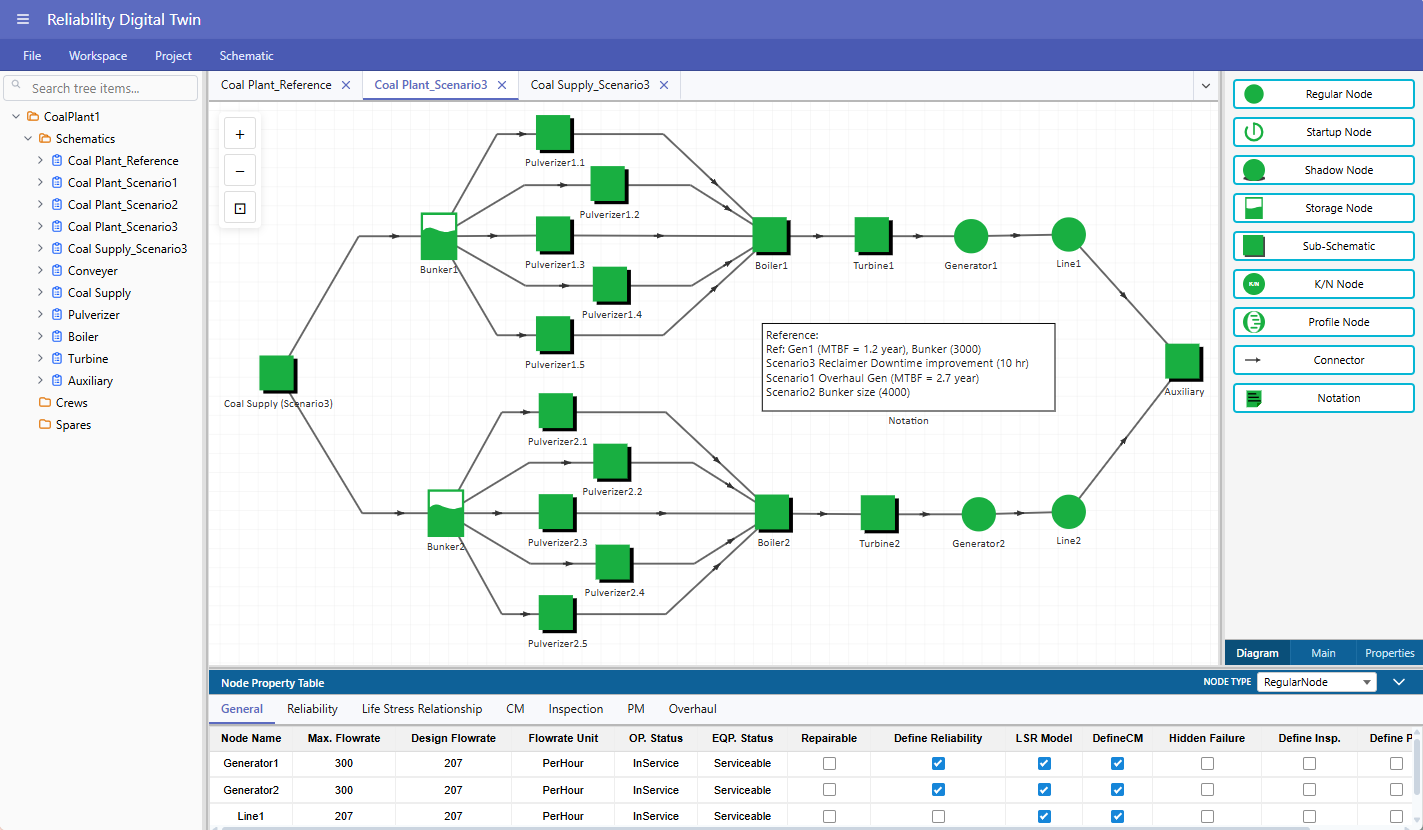
A reference coal-fired power-plant schematic and improvement scenarios demonstrate how equipment reliability, configuration, operating constraints and production can be evaluated together.

Coal-fired power plant Reliability Digital Twin schematic with reference and improvement scenarios
The demonstration includes a reference schematic and alternative improvement scenarios.

04 · Life Cycle Cost

Compare engineering alternatives in economic terms

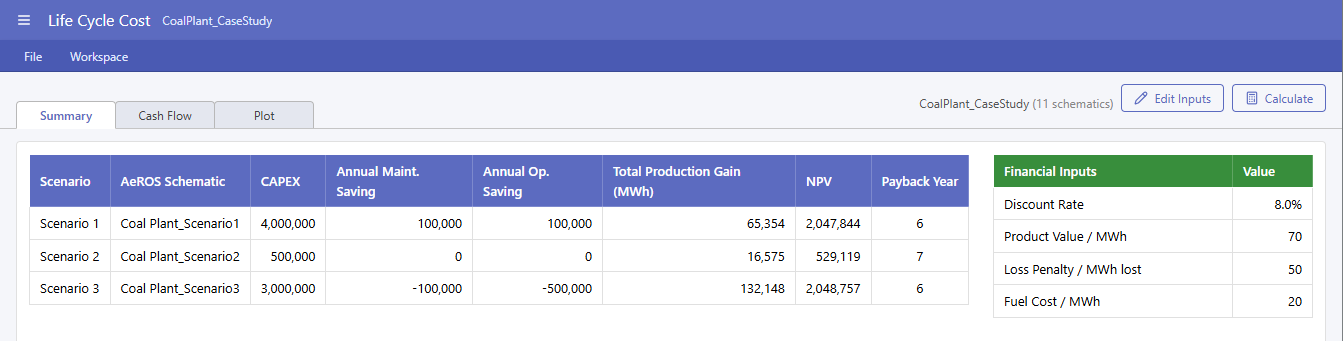
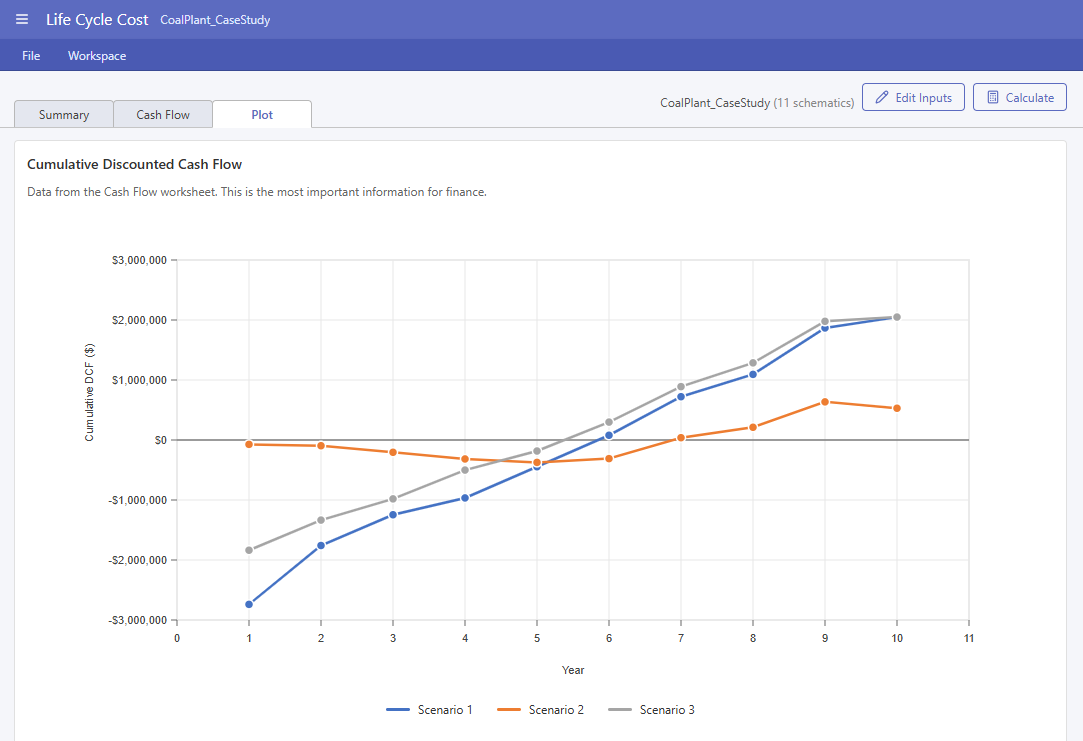
Digital-twin scenarios can be compared using capital expenditure, maintenance and operating savings, production gains, net present value, payback and discounted cash flow.

Life Cycle Cost summary comparing three engineering scenarios
Scenario summary with financial inputs, production gains, NPV and payback.
Cumulative discounted cash-flow comparison for three engineering scenarios
Cumulative discounted cash flow makes the timing and value of each alternative visible.

The engineering challenge

Important decisions are often supported by disconnected analyses

Operational records, maintenance histories, reliability models, system studies and economic evaluations are frequently maintained in separate files and applications. Valuable engineering context can be lost each time information moves from one analysis to the next.

AssetStudio Workspace keeps that engineering thread intact—helping teams organise information, develop reliability knowledge, understand system consequences and compare alternatives within a coherent working environment.

Specialised workspaces

Begin with the engineering problem that matters now

AssetStudio Workspace is not intended to impose one rigid sequence. Engineers can use the workspace most relevant to the current question and connect additional workspaces when a broader evaluation is required.

Workspace

Engineering Information

Organises operational, maintenance, failure and production records. Dashboards, rankings, event timelines, trends and technical reports help engineers identify patterns and decide what requires deeper analysis.

Workspace

Reliability Data Analysis

Transforms historical failure and maintenance data into statistical reliability models through Life Data Analysis and Recurring Data Analysis, supporting trend evaluation, maintenance decisions and later system studies.

Workspace

Reliability Digital Twin Analysis

Represents equipment reliability, system configuration, operational constraints, maintenance resources and production interaction to evaluate performance, quantify losses and compare engineering scenarios.

Workspace

Spare Analysis

Supports rapid analysis of spare-part populations and inventory requirements, including applications where batch analysis is more practical than building detailed digital-twin models for every item.

Workspace

Life Cycle Cost

Uses engineering and simulation results to compare investment, operating cost, maintenance cost, production performance, cash flow and net present value over the asset life cycle.

Connected engineering workflow

From historical information to defensible decisions

When the question requires an integrated study, AssetStudio Workspace provides a logical path for retaining assumptions, models and results across the analysis.

  1. 1

    Understand the information

    Organise available records, operating context and the engineering question.

  2. 2

    Develop reliability knowledge

    Select appropriate statistical methods and quantify asset behaviour.

  3. 3

    Evaluate system consequences

    Connect equipment behaviour with operations, resources, production and losses.

  4. 4

    Compare life-cycle alternatives

    Evaluate engineering and economic consequences before implementation.

Integrated does not mean inflexible

A study may begin in any workspace. Spare Analysis can operate as a specialised activity alongside the core workflow, while information and results can be carried forward when a wider system or economic evaluation becomes necessary.

Part of the AssetStudio portfolio

An integrated ecosystem alongside proven standalone applications

AssetStudio Workspace, AeROS® and Weibull Toolbox serve different engineering needs within the AssetStudio portfolio. AeROS and Weibull Toolbox will continue as standalone desktop applications.

AeROS® remains a standalone application

AeROS continues as AssetStudio's production-centric Reliability Digital Twin software. The Reliability Digital Twin workspace within AssetStudio Workspace is intended to exchange models and results with AeROS rather than make the desktop application obsolete.

Weibull Toolbox remains a separate application

Weibull Toolbox provides Life Data Analysis, Recurring Data Analysis, Accelerated Life Testing and Reliability Block Diagram analysis. AssetStudio Workspace does not include Weibull Toolbox: its Reliability Data Analysis workspace is a separate implementation focused on Life Data Analysis and Recurring Data Analysis for asset-intensive operations.

Designed for asset-intensive operations

Engineering context matters as much as the calculation

AssetStudio Workspace is designed for asset-intensive organisations where equipment reliability, maintenance activity, operational constraints and economic performance are closely connected. Potential applications include—but are not limited to—the industries below.

Energy and Power

Conventional generation, renewable energy and waste-to-energy plants.

Oil, Gas and Petrochemicals

Upstream production, processing, refining and petrochemical facilities.

Chemical and Process Industries

Chemical plants, manufacturing processes and interconnected production systems.

Water and Environmental Infrastructure

Water treatment, wastewater treatment, pumping and environmental services.

Mining and Materials

Mining operations, mineral processing and bulk-material handling.

Transportation and Infrastructure

Rail, ports, airports, fleets and other critical infrastructure.

Request a guided AssetStudio Workspace demonstration

AssetStudio Workspace demonstrations are arranged directly with prospective clients. Contact AssetStudio to tell us about your organisation and engineering problem; we can then arrange an online or in-person discussion and demonstration where appropriate.

Request a Demonstration